Tired of manually changing text formats? Instantly convert your text into UPPERCASE, lowercase, Title Case, or developer-friendly formats like camelCase and snake_case with Pixellize Case Converter. No downloads, no signups—just quick, clean formatting in your browser.
What Is Case Converter?
A Case Converter is a simple online tool that changes the letter format (case) of your text in one click. Instead of manually rewriting text into UPPERCASE, lowercase, Title Case, or coding formats like camelCase and snake_case, you can instantly convert any text to the format you need.
Whether you’re working on website content, coding variables, social media captions, email subjects, or documents, a Case Converter saves time and prevents formatting mistakes. Pixellize Case Converter works directly in your browser, so you don’t need to install any software or create an account.
Why Use Pixellize Case Converter?
Pixellize Case Converter is designed for speed, simplicity, and privacy. It helps you quickly format text for different use cases such as content writing, programming, SEO, and documentation.
Here’s why users prefer Pixellize:
- Saves time by converting large text instantly
- Eliminates manual retyping and formatting errors
- Works 100% online in your browser
- No login, no downloads, no watermarks
- Suitable for both technical and non-technical users
If you frequently copy text from different sources or need consistent formatting, this tool becomes a daily productivity booster.
What Makes Pixellize Case Converter Different from Other Tools?
Many case converter tools online offer only basic options like uppercase and lowercase. Pixellize goes much further by providing advanced text formats and extra utilities in one clean interface.
What makes Pixellize different:
- Supports developer-friendly formats like camelCase, PascalCase, snake_case, kebab-case, CONSTANT_CASE, and dot.case
- Includes smart options like Sentence case, Title Case, Toggle Case, and Reverse Text
- Shows live text statistics (characters, words, sentences, lines, paragraphs)
- One-click copy and download as a .txt file
- Undo formatting and clear all options
- Runs fully in-browser, keeping your text private
It’s not just a case changer—it’s a complete text formatting and utility tool.
How to Use the Case Converter (Step by Step)
Using Pixellize Case Converter is super simple and takes only a few seconds:
Step 1: Paste or Type Your Text
Enter the text you want to convert into the input box. You can paste long paragraphs, code snippets, or short lines.
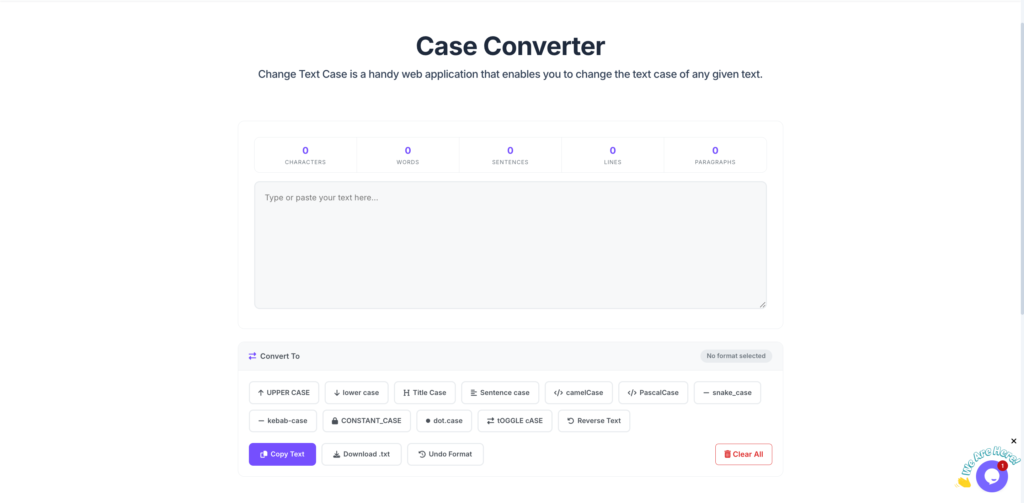
Step 2: Choose a Case Format
Click on the format you need, such as UPPER CASE, lower case, Title Case, camelCase, snake_case, kebab-case, etc. Your text will be instantly converted.
Step 3: Copy or Download the Result
Once converted, copy the text with one click or download it as a text file. You can also undo the formatting or clear everything to start fresh.
Key Features of Pixellize Case Converter
- Multiple case formats: Uppercase, Lowercase, Title Case, Sentence Case
- Developer formats: camelCase, PascalCase, snake_case, kebab-case, CONSTANT_CASE, dot.case
- Extra tools: Toggle case and Reverse text
- Live text statistics (characters, words, lines, paragraphs)
- One-click copy to clipboard
- Download converted text as a .txt file
- Undo last formatting
- No sign-up required, free to use
- Works on desktop and mobile browsers
Who Can Use This Tool?
Pixellize Case Converter is useful for a wide range of users, including:
- Content writers & bloggers – Format headings, titles, and paragraphs easily
- Students – Clean up assignments and notes
- Developers & programmers – Convert variables and function names into proper coding formats
- SEO professionals – Format metadata, headings, and structured text
- Social media managers – Style captions and posts for better readability
- Office professionals – Edit documents, emails, and reports quickly
Basically, anyone who works with text can benefit from this tool.
Is Pixellize Case Converter Safe?
Yes, Pixellize Case Converter is completely safe to use. Your text is processed directly in your browser and is not stored on any server. This means:
- No data is uploaded
- No content is saved
- Your privacy is fully protected
You can confidently use the tool for sensitive text, drafts, or private documents without worrying about data leaks.
Final Thoughts
Pixellize Case Converter is a fast, free, and user-friendly tool for anyone who needs to change text case quickly and accurately. With support for both writing and developer formats, built-in text stats, and privacy-first design, it’s more than just a basic case changer.
If you want to save time, avoid formatting mistakes, and work smarter with text, Pixellize Case Converter is the perfect tool to add to your daily workflow.